
How to Read a Pay Stub: A Line-by-Line Guide 2026
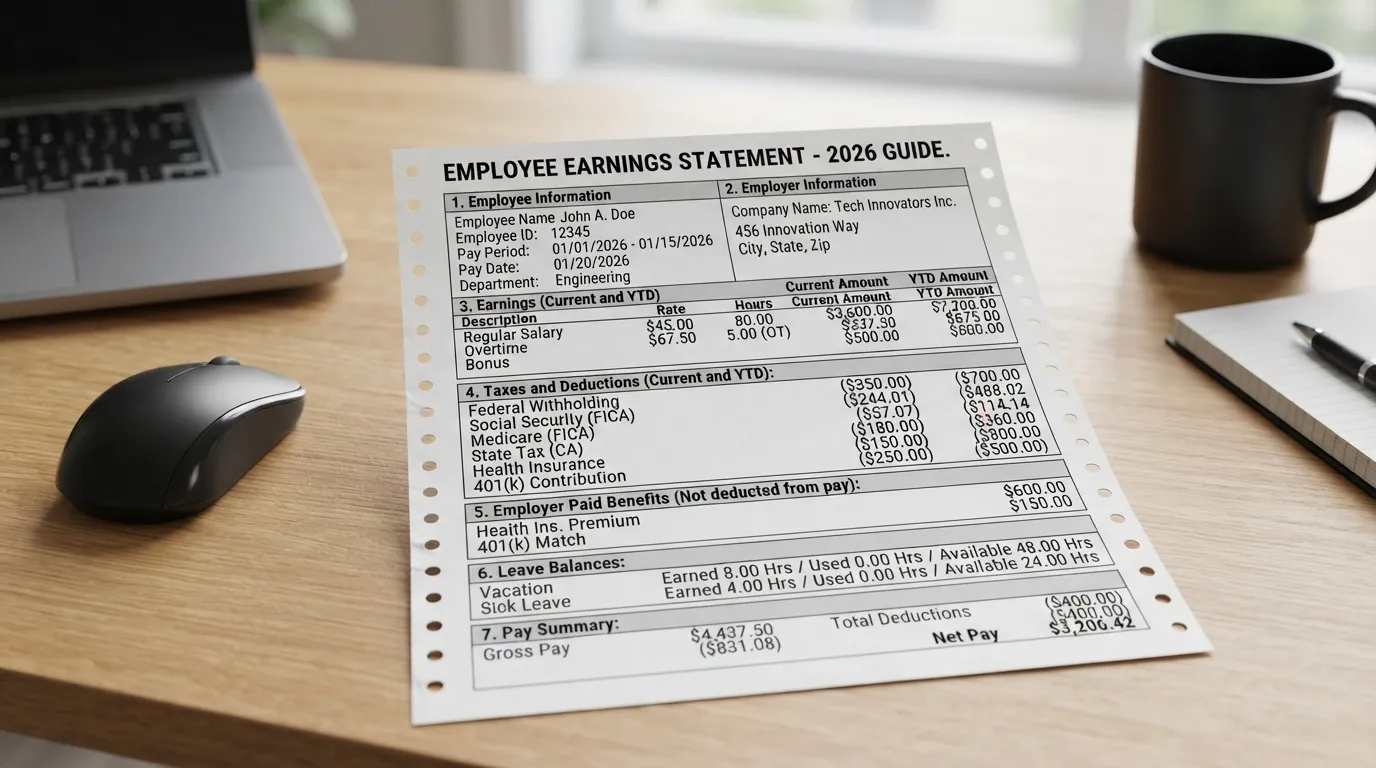
The Complete Guide to Understanding Your Pay Stub
Reading your pay stub can feel like trying to decipher a complex code full of mysterious acronyms, deductions, and numbers. However, taking the time to understand your pay stub is essential for taking control of your personal finances, verifying that you're being paid correctly, and optimizing your tax strategy.
What Is a Pay Stub?
A pay stub (also known as a payslip, pay advice, or earnings statement) is a document issued by an employer that details an employee's gross earnings, deductions, taxes withheld, and net take-home pay for a specific pay period.
- Paper Pay Stubs: Physical paper slips attached to a traditional physical paycheck or handed out separately on payday.
- Electronic Pay Stubs: Digital files (typically PDFs) accessible securely through an employer's online payroll platform, human resources portal, or directly emailed to the employee.
Paycheck vs. Pay Stub — What's the Difference?
While often used interchangeably, a paycheck and a pay stub serve two entirely different purposes:
- Paycheck: The financial instrument (or direct deposit transfer) that actually delivers your money. It represents your Net Pay.
- Pay Stub: The detailed itemized receipt breaking down where every dollar of your Gross Earnings went before the remaining balance hit your bank account.
Header & General Information
The top section of your pay stub contains foundational administrative details for identification and tax accounting.
Employee & Employer Details
This includes the official legal name and address of your employer, alongside your personal details: full name, address, employee identification number (ID), and often a partially masked Social Security Number (SSN) for privacy protection.
Pay Period Dates vs Payment Date
- Pay Period Dates: The exact timeframe during which you earned the wages (e.g., Jan 1 to Jan 15).
- Payment Date (Payday): The actual date the funds are issued or deposited into your account (e.g., Jan 20).
Check Number
A unique sequential tracking number assigned to the specific transaction for payroll record-keeping and auditing purposes.
Earnings Section — Gross Pay Explained
Your Gross Pay represents the full amount of income earned during the pay period before any taxes, benefits, or deductions are subtracted.
Regular Hours vs Overtime
Hourly employees will see their base hours multiplied by their standard wage rate. Overtime (OT) hours—typically any time worked beyond 40 hours in a workweek—are listed separately, calculated at time-and-a-half (1.5x regular pay rate) or double-time depending on labor laws.
Salary vs Hourly Breakdown
Salaried employees receive a fixed base pay allocation per pay period regardless of hours worked, while hourly employees see a direct correlation between total hours logged and total gross pay earned.
Bonuses, Commissions, Holiday/Sick Pay
Additional earnings such as performance bonuses, sales commissions, paid time off (PTO), holiday pay, and sick leave are itemized as distinct line items to distinguish regular operational income from supplemental wages.
How Pay Frequency Affects Your Paycheck
- Weekly: 52 paychecks per year. Smaller individual checks, frequent payout.
- Biweekly: 26 paychecks per year (occurs every two weeks). Includes two "three-paycheck months" each year.
- Semi-Monthly: 24 paychecks per year (typically paid on the 15th and last day of the month).
- Monthly: 12 paychecks per year. Larger individual payouts requiring careful monthly budgeting.
Taxes Withheld on Your Pay Stub
Mandatory government taxes represent the largest chunk taken out of your gross pay.
Federal Income Tax (FIT)
A progressive federal tax based on your taxable wages, filing status (Single, Married, Head of Household), and selections made on your IRS Form W-4.
FICA — Social Security & Medicare
Federal Insurance Contributions Act (FICA) taxes fund federal retirement and healthcare programs:
- Social Security (OASDI): Taxed at 6.2% of your Social Security-taxable wages, up to the annual wage base limit.
- Medicare: Taxed at 1.45% of your Medicare-taxable wages (plus an additional 0.9% for high-income earners).
Note: pre-tax deductions made under a Section 125 cafeteria plan (like most employer health insurance premiums) also reduce your FICA-taxable wages — not just your income-tax base.
State Income Tax (SIT)
State-level tax withholding determined by the state where you work and reside. Rate structures range from flat to progressive percentages (or zero in states with no state income tax).
Local/City Tax
Municipal, county, or local city taxes levied by specific regions to fund local public services, public schools, and infrastructure.
Deductions — Pre-Tax vs Post-Tax
Deductions are expenses subtracted from your earnings to cover benefits, retirement, or legal obligations.
Pre-Tax Deductions
Subtracted from your gross income before income taxes are calculated. These reduce your overall taxable income, saving you money on taxes.
- Traditional 401(k) / 403(b) Retirement Contributions
- Health, Dental, and Vision Insurance Premiums
- Flexible Spending Accounts (FSA) and Health Savings Accounts (HSA)
Post-Tax Deductions
Subtracted after taxes have been calculated and applied to your gross income.
- Roth 401(k) Contributions
- Wage Garnishments (child support, tax levies, unpaid debts)
- Union Dues and Charitable Donations
| Deduction Type | Pre-Tax or Post-Tax? | Effect on Taxable Income |
|---|---|---|
| Traditional 401(k) | Pre-Tax | Reduces Taxable Income |
| Health Insurance | Pre-Tax | Reduces Taxable Income |
| FSA / HSA | Pre-Tax | Reduces Taxable Income |
| Roth 401(k) | Post-Tax | No Effect |
| Wage Garnishments | Post-Tax | No Effect |
| Union Dues | Post-Tax | No Effect |
Common Pay Stub Abbreviations
| Abbreviation | Full Meaning | Description |
|---|---|---|
| FIT / FW T | Federal Income Tax | Federal income tax withholding |
| FICA | Federal Insurance Contributions Act | Combined Social Security and Medicare taxes |
| OASDI | Old-Age, Survivors, and Disability Insurance | Official name for Social Security tax (6.2%) |
| SIT / SWT | State Income Tax / State Withholding Tax | Income tax levied by state government |
| YTD | Year-to-Date | Cumulative earnings/deductions for the current calendar year |
| OT | Overtime | Pay rate for extra hours worked (usually 1.5x) |
| GRSH / GROSS | Gross Pay | Total earnings before any deductions or taxes |
Year-to-Date (YTD) Totals
Your pay stub includes two critical columns: Current Period (what was earned/deducted during this specific pay period) and Year-to-Date (YTD) (the cumulative totals from January 1st up to the current pay date).
Pay Stub vs. W-2 — How They're Related
Your final pay stub of the year (ending in late December) reflects your annual total earnings and withholdings. This line-by-line YTD balance should match the figures reported on your official tax document, Form W-2, issued by your employer each January.
Net Pay — Final Take-Home Calculation
Net Pay is the bottom-line dollar figure that you actually take home and receive in your bank account.
Direct Deposit Breakdown on Your Stub
If you split your paycheck across multiple accounts (e.g., 80% to Checking, 20% to Savings), your pay stub's direct deposit section will display the exact dollar distribution sent to each specified bank account number.
Want to calculate your exact net take-home pay based on your location and withholdings?
Calculate Your Exact Take-Home Pay with Our Paycheck CalculatorSample Pay Stub Example (Visual Walkthrough)
Here is an example structure of a standard pay stub layout:
EMPLOYEE: John Doe
ID: #EMP-8839
PAY DATE: 10/20/2026
CHECK NO: 100492
Get This Breakdown as a Free Printable PDF
A one-page, numbered cheat sheet you can save or print — plus a few extra tips not covered above, like employer 401(k) matching and tax credits vs. deductions.
How to Spot Errors on Your Pay Stub
Common Mistakes
- Incorrect hours logged (missing overtime or unrecorded hours).
- Inaccurate hourly wage rate or missing promotional raise updates.
- Incorrect tax withholding settings caused by outdated W-4 forms.
- Missing employer contribution matches for 401(k) accounts.
What to Do If You Find an Error
Notify your payroll department or HR representative immediately. Provide written documentation (such as timecards, shift logs, or email approvals) showing the discrepancy so they can issue a retroactive pay adjustment on your next pay period.
How to Use Your Pay Stub to Make Smarter Money Decisions
Catching Under-Withholding Before Tax Season
Reviewing your YTD Federal Tax withholding helps prevent tax-time surprises. If you notice you aren't withholding enough tax, submit an updated IRS Form W-4 to adjust your withholdings.
Using Pre-Tax Deductions to Optimize Retirement Savings
Increasing your traditional 401(k) or HSA contribution directly lowers your taxable gross income on every paycheck, saving you money on current income tax while building wealth.
Tracking YTD Toward Your Savings/Budget Goals
Your YTD figures give you a clear, real-time snapshot of your true annual earning trajectory, enabling more precise budgeting and emergency fund tracking.
How to Get a Copy of Your Pay Stub
Online Employer/Payroll Portal
Most modern employers utilize self-service employee portals (e.g., ADP, Paychex, Workday, Gusto) where you can download PDF copies of current and past pay stubs 24/7.
Requesting from HR
If you lack digital access, submit a formal written request to your HR or accounting department requesting copies for specific historical pay dates.
1099 / Self-Employed — No Traditional Pay Stub?
If you work as an independent contractor or freelancer, you won't receive standard payroll pay stubs. To prove income for loans or leases, use line-item invoices, bank statements showing client payments, official 1099-NEC/MISC tax forms, or profit-and-loss (P&L) statements.
Is Your Employer Required to Give You a Pay Stub?
Federal law under the Fair Labor Standards Act (FLSA) requires employers to keep accurate wage records, but does not mandate issuing pay stubs directly to workers. However, state laws vary significantly: most states require employers to provide itemized pay statements (either paper or electronic with opt-out choices).
Check your specific state regulations and guides here: View State-by-State Pay Stub Mandate Laws & State Calculators.
Frequently Asked Questions (FAQs)
📌 Related Articles You Might Like
How To Calculate Adjusted Gross Income From Paycheck
https://payscheckcalculator.com/blog/how-to-calculate-adjusted-gross-income-from-paycheck/
Visit This Blog →How Much Taxes Are Taken Out Of A Severance Package
https://payscheckcalculator.com/blog/how-much-taxes-are-taken-out-of-a-severance-package/
Visit This Blog →How Federal Tax Is Calculated On Paychecks
https://payscheckcalculator.com/blog/how-federal-tax-calculated-paychecks/
Visit This Blog →Marriage Tax Penalty Calculator
https://payscheckcalculator.com/blog/marriage-tax-penalty-calculator/
Visit This Blog →Commission Paycheck Calculator
https://payscheckcalculator.com/blog/commission-paycheck-calculator/
Visit This Blog →
Written & verified by Daniel R. Whitmore
Founder & Developer, PayCheckCalculator.com
Last updated: July 2026
0 Comments